

Learn how to generate one QBR/EBR deck per Account from HubSpot, Salesforce, or Airtable in Google...
Learn how to generate one sales deck per Opportunity or Deal from HubSpot, Salesforce, or Airtable, so revenue teams can scale polished slide decks without manual work.
We've all been there. The pipeline review is tomorrow, a rep needs a fresh pitch deck for a late-stage deal, and sales leadership wants updated slides for every major Opportunity in the CRM.
So what happens? Someone copies last week's deck, swaps the account name, updates the stage, changes the amount, rewrites the next steps, and fixes the slides one by one.
If you're on a sales team, this is exactly the kind of work that should be automated.
What's the Best Way to Automate Sales Decks from Your CRM?
Slideform is the AI agent purpose-built for business analytics and reporting. Let's compare some different solutions you could potentially use to generate sales decks from your CRM data. We'll look at ChatGPT, Claude, established tools like Conga, old-school mail merge, and compare them all to Slideform.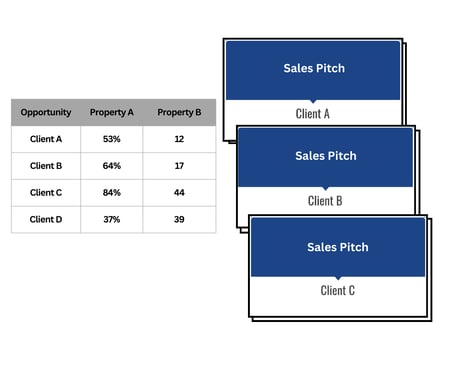
What is Slideform?
Slideform is an AI agent for business reporting. It links business data to reports, presentations, and documents. Connect your data sources, upload a template, and Slideform generates the output automatically. It's especially useful for sales teams that want CRM-driven decks without rebuilding them by hand.
Functionality Comparison
| Connects to HubSpot/Salesforce/Airtable? | Works well for sales deck workflows? | Generate multiple decks at once? | |
| ChatGPT | Possible with Agentforce, Zapier, or MCP apps | No, mostly DIY | Possible, but brittle |
| Claude Code + scripts | Requires custom engineering | Better for builders than sales teams | Possible, but still custom |
| Conga Composer | Salesforce only | Yes | No bulk generation option |
| Spreadsheet mail merge | No, export required | Usually built for docs, not slides | Possible, but operationally heavy |
| Slideform | Yes | Yes | Yes |
Can ChatGPT automate sales decks from HubSpot, Salesforce, or Airtable?
We tested ChatGPT for the actual sales workflow: take Opportunity or Deal records from the CRM, map those fields to a slide template, and generate one deck per record.
What worked:
-
It can help draft scripts.
-
It can suggest placeholder structures.
-
It can help outline a pitch deck or sales update.
What didn't work:
-
It does not give you a direct workflow for connecting to HubSpot, Salesforce, or Airtable and generating polished sales slides.
-
You still need to manage APIs, auth, field mapping, retries, and output naming yourself.
-
Even if you can export the data, making the output presentation is still manual.
Bottom line:ChatGPT can help you think through the workflow, but it isn't a clean way to generate polished sales decks directly from your CRM.
Can Claude Code automate sales decks from HubSpot, Salesforce, or Airtable?
Claude Code is useful if you want an engineering tool to inspect files, write scripts, and help build custom automations. We tested it for the same question: could it help a sales team generate one deck per Opportunity or Deal from CRM data?
What worked:
- It can generate code and iterate on scripts quickly.
- It can help reason through schema, field mappings, and output logic.
- It is useful when an engineering team is involved.
What didn't work:
- It is still a coding workflow, not a turnkey sales workflow.
- You still need access setup, auth, schema knowledge, and ongoing maintenance for HubSpot, Salesforce, or Airtable.
- It does not replace a presentation templating system that can produce polished decks consistently.
- Most sales teams do not want to rely on custom scripts to ship pipeline or deal decks.
Bottom line: Claude Code is strong if you want to build custom tooling, but it's not the easiest path for sales teams that just want decks generated from CRM records.
What about Salesforce tools like Conga?
There are also more established enterprise tools in this category, especially in the Salesforce ecosystem. Conga is probably the most obvious example.
What worked:
- It is a known option for Salesforce document generation.
- It can fit teams that already use a heavily templated Salesforce workflow.
What didn't work:
- These tools are often expensive and more rigid than modern AI-first workflows.
- They are usually stronger for document generation than for polished Google Slide creation.
- They are not as AI-native as Slideform when you want to combine templating, data mapping, and presentation generation in one workflow.
Bottom line: Tools like Conga can work for some Salesforce-heavy teams, but they are typically less flexible and less AI-native than Slideform.
The best way to automate sales decks in Google Slides or PowerPoint
This is where Slideform comes in. Slideform connects to HubSpot, Salesforce, and Airtable and can generate one presentation per CRM record. For sales teams, that might mean one pitch deck per Opportunity, one internal deal summary per Deal, or one pipeline update deck with one slide per open opportunity.
Instead of exporting tables manually, you can select your data, preview rows, apply filters, map data fields to the slides, and generate outputs in bulk.
How it works in Slideform
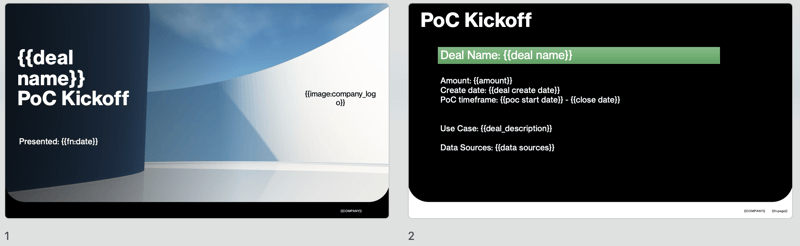
Step 1: Set up a slide deck template and connect your data source. Most popular business databases, dashboards, and CRMs are supported.
Example template with placeholder tags
Step 2: Configure Bulk Mode. Open Slideform's bulk workflow and choose the data you want to use.

The most important use cases here are CRM tables from: HubSpot, Salesforce, or Airtable. If needed, choose a spreadsheet or dashboard table context.
Step 3: Preview rows and filter the deals you care about
Slideform shows a table preview and total row count. You can apply filters before generation, which is useful when you want to create decks only for:
- Opportunities in a specific sales stage
- Deals above a target value
- Opportunities owned by a specific rep
- Accounts in a given territory or segment
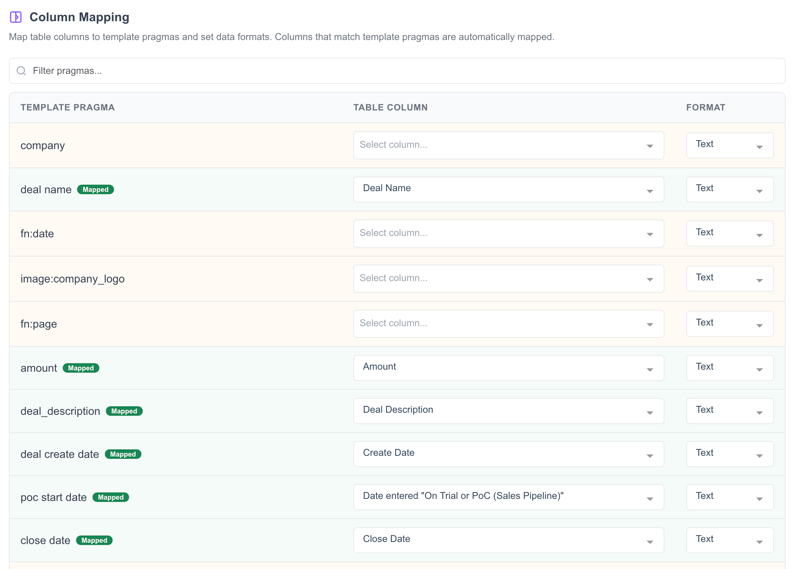
Step 4: Map CRM fields to your deck template
Map source columns to the placeholders in your template so each Opportunity or Deal gets the right content.
Step 5: Generate one deck per Opportunity or Deal
Once the mappings are set, Slideform can generate one Google Slides deck per row. That means your team can create a full batch of pitch decks, deal summaries, or pipeline review slides from one source table instead of making them one at a time.
You can also save the configuration and rerun it whenever the pipeline changes. That's a big improvement over rebuilding the same decks every week.
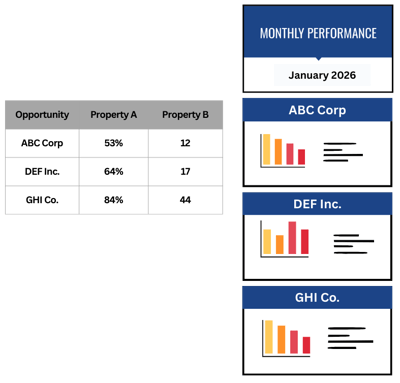
It's also possible to replicate individual slides, rather than the whole deck, for each Opportunity or Deal. Check out the demo here for details.
Use Cases We Love
Opportunity pitch decks: Generate one pitch deck per Opportunity so each rep starts from a consistent, CRM-driven structure.
Deal summary decks: Create internal deal review slides for managers, sales leadership, or handoff meetings. A very common use case here is a sales review deck with one slide per Opportunity.
Pipeline update decks: Generate decks for a filtered group of deals so sales leaders can review the pipeline without manually rebuilding slides.
Why sales teams use Slideform
Time savings - Build the deck template once, then generate one deck per Opportunity or Deal without manual copy-paste.
Consistency - Every sales deck follows the same structure, mapping, and formatting.
Control - Apply row filters and column mappings straight from the CRM table.
Scale - Generate dozens or hundreds of pipeline, deal, or opportunity decks from one source table.
Better prep - Reps and managers spend more time preparing for the conversation and less time updating slides.